Settings
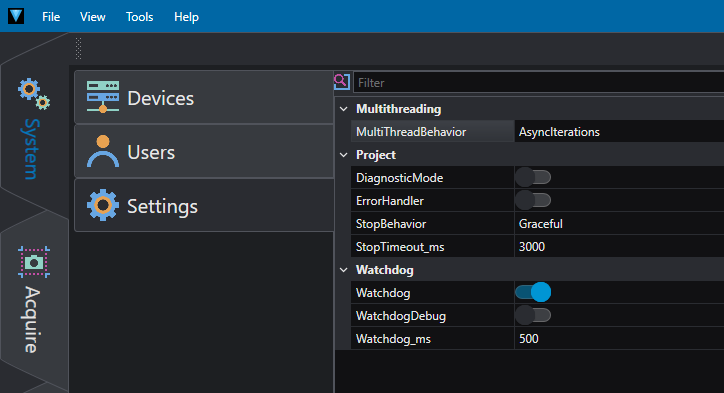
In this section, you can modify the project parameters.
- Diagnostic Mode: allows to produce an extended log which can be inspected by setting Trace in the log output. In diagnostic mode the project is also saved before starting the execution (single run or loop mode) in a temporary directory; if a crash happens the project can be recovered from File> Recovered Projects.
- Watchdog: enables/disables the watchdog in the auxiliary tasks block.
- Watchdog Debug: enables/disables the debug for the Watchdog.
- Watchdog ms: time interval between Watchdog task runs.
- Error Handler: enables/disables the Error Handler which allows to handle errors during the execution. The Error Handler is globally invoked when a Tool fails and, if the error happened inside a loop, the iteration breaks.
- MultiThread Behavior: allows to specify the behavior when working with multithread. If
SyncIterationis set the threads iterations are synchronized; as a result the faster thread waits for the slower thread to finish the iteration. IfAsyncIterationis set each thread runs at its owns speed; as a result different frame rate can be reached for each thread. - StopBehavior: allows to specify how the project stops. If
Gracefulis set, the Finalize block is called only when the end of the main loop is reached. IfBreakis set, the loops break immediately the iteration and the Finalize block is called. - StopTimeout_ms: specifies the timeout in ms when the project is stopped. When the stop is sent, especially if StopBehavior is set to
Graceful, it can take some time for the project to exit the loop and call the Finalize. The timeout value tells the system how much it can wait before considering the stop procedure failed and, when the timeout is reached, start the abort procedure to forcibly stop the threads.