Error handling
Different types of errors can be fired during job execution; when a tool encounters an error it produces a struct called ErrorState composed by a numeric code and a message used to describe the error.In OEVIS® users can use this information to change the Job behavior and perform appropriate actions.
In the following section the error types and codes are described and how they can be handled using Error Handler and Try/Catch function.
The ErrorState struct
The ErrorState is the main struct used to contain the error information and it is defined as followed:
struct ErrorState
{
    /// The error code associated with the current error state. 0 indicates no error.
    Int ERROR_CODE;

    /// The error message associated with the current error state.
    String ERROR_MESSAGE;
}
| Name | Error class code | Description |
|---|---|---|
| GenericError | -1 | Generic error type which can be used to handle all types of errors. |
| RuntimeError | 0 | Identifies execution related errors.These errors occur during tools execution (eg. runtime exceptions, oevislib errors, etc.). Codes [0...999]. |
| LicenseError | 1 | Identifies license related errors (eg. add-on license issues). Codes [1000...1999]. |
| DeviceError | 2 | Identifies device related errors.These errors occur at low level (eg. hardware malfunctions, camera issues, etc).Codes [2000...2999]. |
| UserError | 9 | Identifies user custom error. User can use this type to define their own error codes. Codes [9000...9999]. |
The following table shows the list of pre-defined error codes in OEVIS®:
| Name | Code | Description |
|---|---|---|
| Generic | -1 | Generic error with undefined error code or related to System generic exceptions. |
| NoError | 0 | No error. |
| LibRuntimeError | 1 | Exception that happens inside a function, during runtime in oevislib. |
| LibOutOfMemoryError | 2 | Exception caused when accessing unavailable memory in oevislib. |
| LibIOError | 3 | Exception caused by failure during input/output operations in oevislib. |
| LibOSError | 4 | Operating system exception in oevislib. |
| LibDomainError | 5 | Exception caused when an input parameter is outside the constraints defined in oevislib. |
| LibFatalError | 6 | Exception occurred for unknown reasons in oevislib. |
| LibLicenseError | 99 | Exception thrown in case of problems with the license in oevislib. |
| LibNullPtrError | 100 | Exception caused by a null pointer access in oevislib. |
| LibUnexpectedError | 101 | Exception caused by an unexpected error in oevislib. |
| LibUnknownError | 102 | Exception caused by an unknown error code in oevislib. |
| LibAssemblyLoadError | 103 | Exception caused when an assembly fails to load in oevislib. |
| SerializationError | 20 | Exception caused project save/load operations. |
| AssemblyError | 30 | Exception caused during assembly operations (dynamic object creation, method invocation etc.). |
| ToolExecutionError | 200 | Exception caused during tool execution. |
| ToolInvalidArgumentError | 201 | Exception caused by invalid arguments passed to a tool. |
| LicenseInvalidError | 1000 | The license is not found or corrupted. |
| LicenseAddOnError | 1001 | The add-on license is not found or corrupted. |
| DeviceGenericError | 2000 | Generic device error. |
| DeviceAcquisitionError | 2001 | Error related during device acquisition. |
| DeviceAcquisitionTimeoutError | 2002 | Device acquisition timeout. |
| DeviceNotImplementedError | 2003 | Feature or command not implemented or not available in device. |
| DeviceArgumentError | 2004 | Invalid argument provided to device for the parameter. |
| GenApiGenericError | 2100 | Generic GenApi error. |
| GenApiBadAllocError | 2101 | Bad allocation in GenApi. |
| GenApiInvalidArgumentError | 2102 | Invalid argument error in GenApi. |
| GenApiOutOfRangeError | 2103 | Out of range error in GenApi. |
| GenApiPropertyError | 2104 | Property access error in GenApi. |
| GenApiRuntimeError | 2105 | Runtime error in GenApi. |
| GenApiLogicError | 2106 | Logic error in GenApi. |
| GenApiAccessError | 2107 | Access error in GenApi. |
| GenApiTimeoutError | 2108 | Timeout error in GenApi. |
| GenTLGenericError | 2200 | Generic GenTL error. |
| CTILoadError | 2201 | CTI load error. |
| CTIMissingMethodError | 2202 | CTI missing method error. |
| InvalidParameterError | 2203 | Invalid parameter error in GenTL. |
| NotInitializedConsumerError | 2204 | Consumer is not initialized in GenTL. |
| GC_GenericError | 2205 | GenICam generic error. |
| GC_NotInitializedError | 2206 | GenICam not initialized error. |
| GC_NotImplementedError | 2207 | GenICam not implemented error. |
| GC_ResourceInUseError | 2208 | GenICam resource in use error. |
| GC_AccessDeniedError | 2209 | GenICam access denied error. |
| GC_InvalidHandleError | 2210 | GenICam invalid handle error. |
| GC_InvalidIDError | 2211 | GenICam invalid ID error. |
| GC_NoDataError | 2212 | GenICam no data error. |
| GC_InvalidParameterError | 2213 | GenICam invalid parameter error. |
| GC_IOError | 2214 | GenICam I/O error. |
| GC_TimeoutError | 2215 | GenICam timeout error. |
| GC_AbortError | 2216 | GenICam abort error. |
| GC_InvalidBufferError | 2217 | GenICam invalid buffer error. |
| GC_NotAvailableError | 2218 | GenICam not available error. |
| GC_InvalidAddressError | 2219 | GenICam invalid address error. |
| GC_BufferTooSmallError | 2220 | GenICam buffer too small error. |
| GC_InvalidIndexError | 2221 | GenICam invalid index error. |
| GC_ParsingChunkError | 2222 | GenICam parsing chunk error. |
| GC_InvalidValueError | 2223 | GenICam invalid value error. |
| GC_ResourceExhaustedError | 2224 | GenICam resource exhausted error. |
| GC_OutOfMemoryError | 2225 | GenICam out of memory error. |
| GC_BusyError | 2226 | GenICam busy error. |
| GC_CustomIDError | 2227 | GenICam custom ID error. |
| ModbusGenericError | 2300 | Generic Modbus error. |
| ModbusSerialPortNotOpenedError | 2301 | Serial port is not opened. |
| ModbusConnectionError | 2302 | Connection to Modbus device failed. |
| ModbusFunctionCodeNotSupportedError | 2303 | Modbus server returned error: function code not supported. |
| ModbusQuantityInvalidError | 2304 | Modbus server returned error: quantity invalid. |
| ModbusStartingAddressInvalidError | 2305 | Modbus server returned error: starting address and quantity invalid. |
| ModbusCRCCheckFailedError | 2306 | Modbus CRC check failed. |
| GenericUserError | 9000 | Generic user error. |
Info
If the user wants to handle a custom error code the range [9000...9999] can be used.
The error data can be inspect in the Property inspector panel every time a tool fails the execution.
ErrorHandler Task
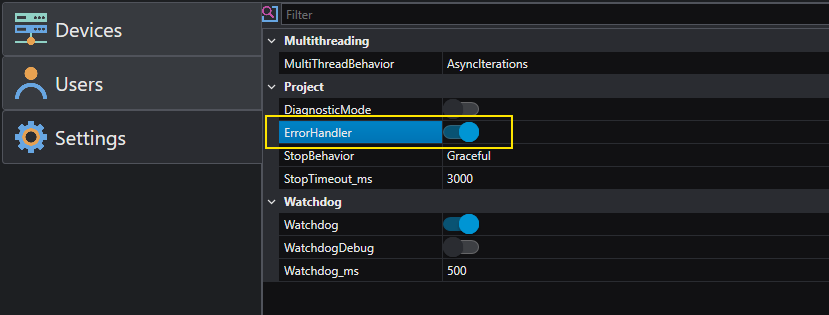
The ErrorHandler is a built-in task in the project that can be used to handle errors once it has been enabled in project settings.
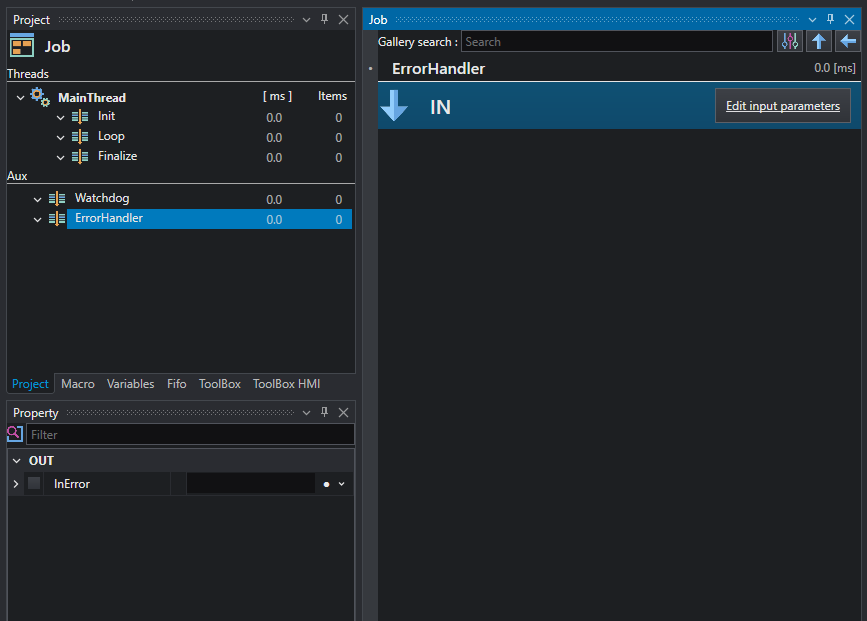
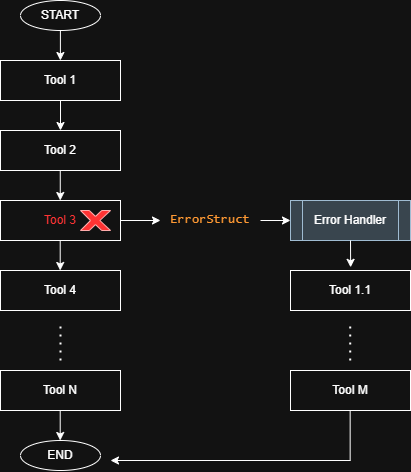
The ErrorHandler has only one input parameter of type ErrorStruct; when a tool fails the execution, the flow is interrupted and the ErrorHandler is invoked using the tool ErrorStruct as parameter for the handler.
Once the handler has been invoked the execution returns and flow continues.
Info
The ErrorHandler breaks the flow execution,this means that the tools after the one that triggered the ErrorHandler are not executed.
Danger
The ErrorHandler cannot trigger itself (to prevent recursive overflow), so any error occurring inside the handler must be handled by other means, such as a Try/Catch block.
It is important to remember that the ErrorHandler has a global scope and can be triggered by any tool in the job, at any point.For this reason it is suggested to use it for general purpose handling; for a more robust and aimed behavior the Try\Catch function is preferred.
Try/Catch
The Try/Catch allows user to define a Job section where tools can be executed and in case of errors perform specific action inside the block.
To create a new block, add it inside the Job from the gallery.
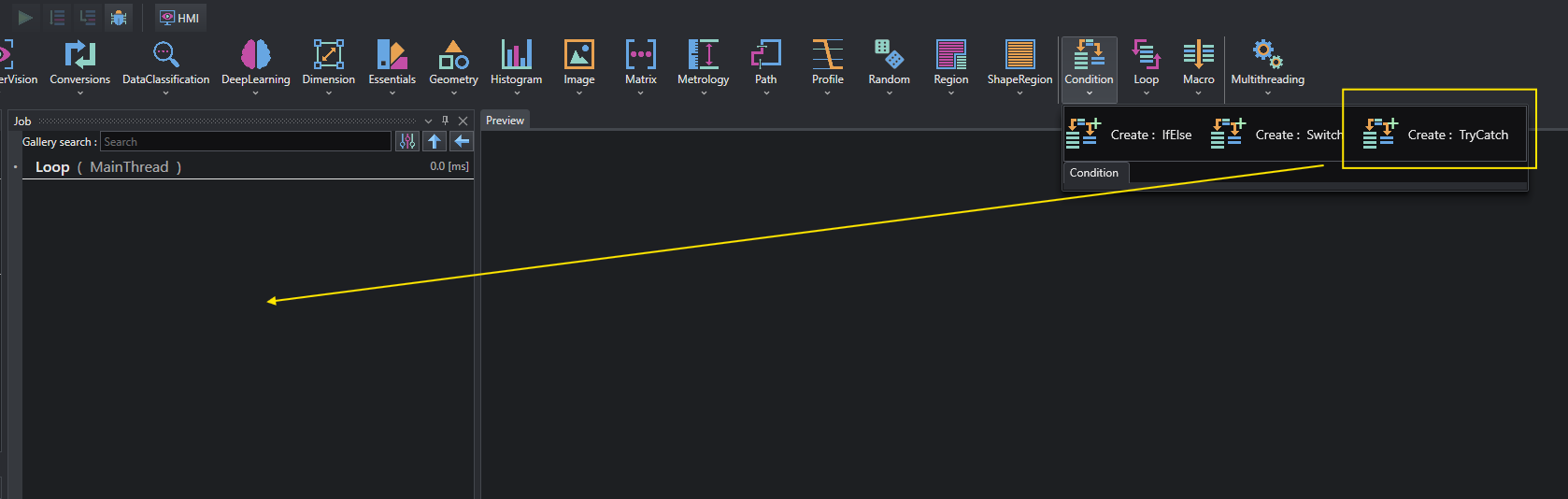
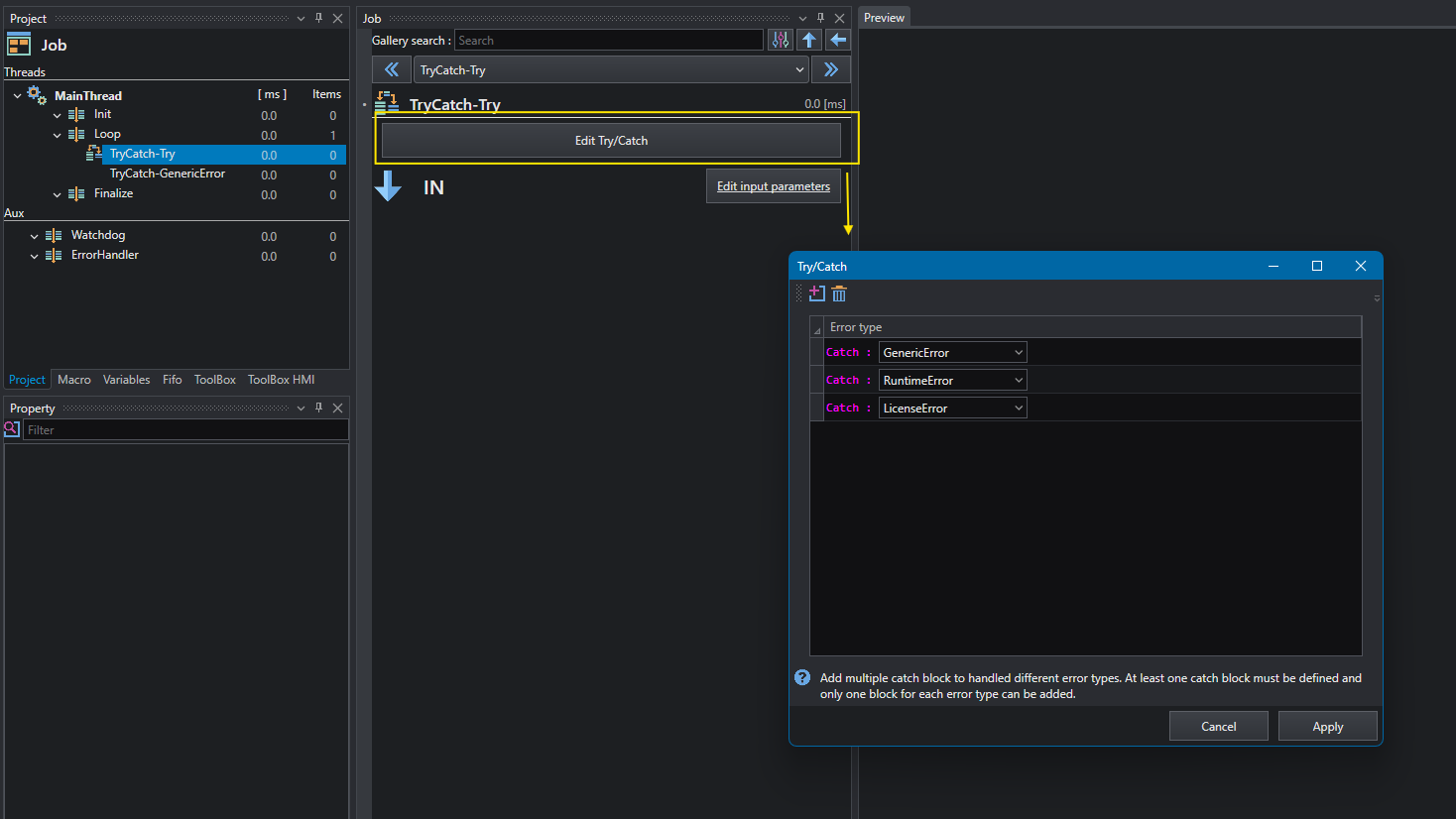
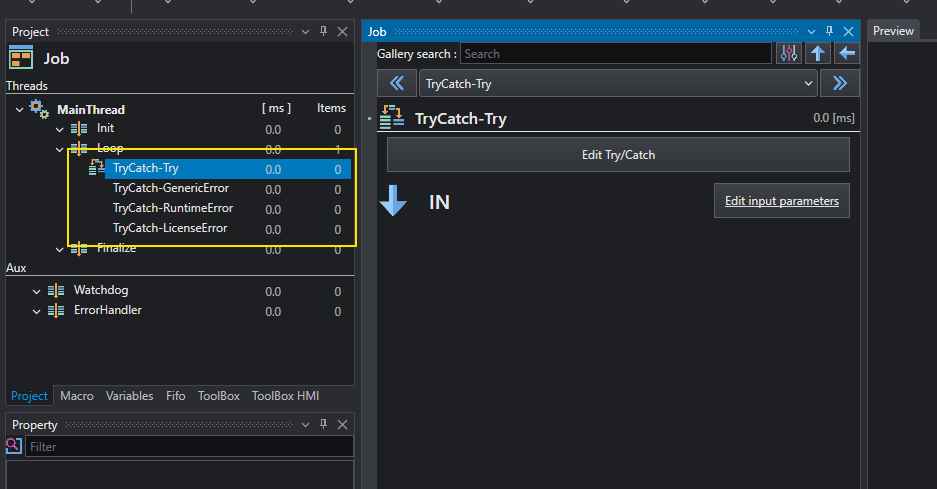
The Try/Catch is designed to handle error based on its Error Class;it is possible to define multiple catch blocks for each error class to perform different actions for different error categories.
Open the editor to add or remove catch blocks.
Info
Only one catch block is allowed for each error class.
When a tool in the Try block fails, its ErrorStruct value is analyzed and the Catch block is chosen based on the Error class (got from ErrorCode); the catch block is then executed.The mechanism is similar to a Switch where the input value is an integer (the Error class value) and the catches are the switch cases.
Info
Inputs/Outputs are available for both the Try and Catch block, allowing to handle parameters also in case of error.
Info
When evaluating the Catch block to execute, the system searches if a catch for the given error class is defined;if not then the GenericError catch is searched.If no catch block satisfies these conditions, the Try/Catch block fails.
Programmer insight
Using multiple Error classes in Try/Catch is equivalent to the following code
    try
    {
        //... do stuff
    }
    catch(NullReferenceException e){ }
    catch(InvalidArgumentException e){ }
    catch(Exception e){ /*Generic error*/ }
Throw errors
User can decide to throw errors if custom conditions are reached even if tools are executed correctly; for example if a number of blobs is expected to be greater or equal to 5 it is possible to throw an error to trigger specific action when the number is less than 5.
This operation can be done with Statement.Throw which allows to throw an error with a specific error code and message. In alternative, it is possible to use Statement.Throw_FromErrorCode which allows to throw an error using one of the pre-defined error code as enum value.